Note-taking
Cornell Notes for Maths: The Method, an Example and a Free LaTeX Template
How the Cornell note-taking method works, why it suits maths, a worked lecture example, and a free LaTeX Cornell notes template to copy or download.
Makes a notebook of Cornell paper in your dashboard to write on with a pen or Apple Pencil. Every page you add is Cornell paper too.
Most maths notes are a transcript of the board: complete, accurate, and almost never read again until the week before the exam. The Cornell method keeps exactly the same notes but adds two small sections that turn each page into revision material. This guide explains how it works, how to adapt it for maths, and gives you a LaTeX template that does the layout for you.
What are Cornell notes?
Walter Pauk, an education professor at Cornell University, developed the method in the 1950s and set it out in his book How to Study in College. It divides every page into three parts.
- Notes, the wide right-hand column: everything you write during the lecture.
- Cues, the narrow left-hand column: questions and key words you add after the lecture, each one next to the notes it refers to.
- Summary, the strip along the bottom: the whole page in two or three sentences.
The measurements in the diagram come from Pauk's original letter-size page. On A4 paper or a tablet the exact numbers matter less than the proportions: a cue column a little under a third of the width, and a summary about a fifth of the height.
How to take Cornell notes
Pauk described the method as five steps, often called the five Rs.
- Record. During the lecture, write in the notes column only: definitions, theorem statements, worked examples and anything the lecturer stresses. Leave a line or two between ideas so there is room for cues later.
- Reduce. Soon after the lecture, ideally the same day, read through your notes and write a cue next to each idea. A cue can be a question the notes answer, a key word, or a prompt such as "proof?".
- Recite. Cover the notes column. Read each cue and answer it aloud or on scrap paper, then uncover the notes and check.
- Reflect. Ask how the material connects to what you already know. Where would you use this result? What earlier topic does it build on?
- Review. Spend a few minutes each week answering the cues on older pages, so nothing is left until exam season.
Finish each page by writing the summary at the bottom, in your own words and without looking at the notes.
Why Cornell notes work well for maths
The method predates most research on studying, but its two main habits match what that research found. In a large review of study techniques, Dunlosky and colleagues rated two as the most useful: practice testing and spreading study out over time. The cue column turns every page into a ready-made practice test, and the review step spreads that testing across the term. Roediger and Karpicke showed the same effect in a lab: a week after studying a passage, students who had tested themselves on it remembered more than students who had simply reread it.
Maths has a particular weakness that cues fix. Notes copied from the board record what was done but rarely why. A cue like "Why does the substitution work here?" forces you to supply the missing reasoning. If you cannot answer it, you have found the gap before the exam does.
One honest caveat: studies that compare note-taking formats directly give mixed results. The benefit comes from actually doing the reduce, recite and review steps. A page with an empty cue column is just ordinary notes in a narrower column.
What goes where in maths notes
| Section | What to put there | Example from a calculus lecture |
|---|---|---|
| Notes | Definitions, theorem statements, worked examples, diagrams | The integration by parts formula and a worked example |
| Cues | Questions, triggers for when to use a method, warnings | "How do I choose ?", "Common mistakes" |
| Summary | The main idea and when to use it | "Use it for products, choose with LIATE, check by differentiating" |
A few habits make the method work much better for maths:
- Turn theorems into questions. Instead of the cue "Mean value theorem", write "What does the mean value theorem guarantee, and what are its conditions?" Remembering the conditions is usually the part that costs marks.
- Write the trigger next to each worked example. Note what tells you to use the method, such as "a product of two functions", so you recognise it in a question you have not seen.
- Keep a cue for mistakes. Give every page a "common mistakes" cue. Sign errors and forgotten conditions are easier to avoid once you have written them down.
- Mark the steps you did not follow. Put a "?" in the cue column next to any line of a derivation you could not follow, and clear it before the next lecture.
- Write the summary without looking. If you cannot summarise the page from memory, you know which cues to recite again.
A worked example
Here is one page of Cornell notes from a first-year calculus lecture on integration by parts, typeset with the LaTeX template further down.
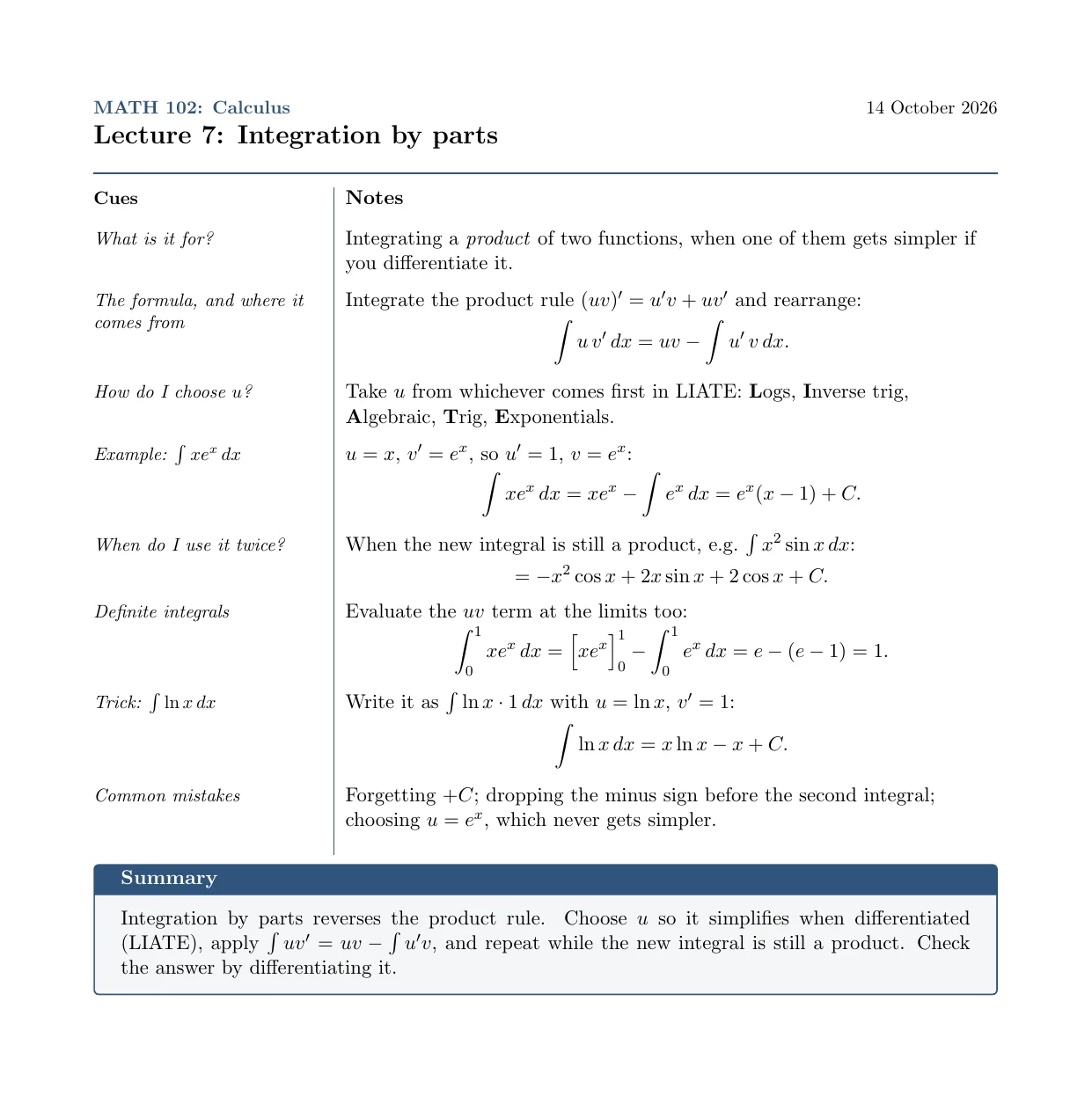
The notes column is mostly what was on the board, the cue column is mostly questions, and the summary is short enough to read in ten seconds. Covering the right-hand side and answering "How do I choose ?" or "Trick: " takes under a minute, which makes it easy to keep doing every week.
Free LaTeX Cornell notes template
If you type your notes, or tidy them up after the lecture, LaTeX can do the layout for you. Each \cue{...}{...} adds one row, with the cue on the left and its notes on the right, and the line between the columns stays unbroken from top to bottom. The template only uses standard packages, so it compiles in LatexNotes, Overleaf or any LaTeX installation.
\documentclass[11pt,a4paper]{article}
\usepackage[margin=1.8cm]{geometry}
\usepackage{amsmath,amssymb}
\usepackage{array,tabularx}
\usepackage{xcolor}
\usepackage{tcolorbox}
\pagestyle{empty}
\setlength{\parindent}{0pt}

\definecolor{cornell}{RGB}{47,84,125}

% Header: \lecture{module}{title}{date}
\newcommand{\lecture}[3]{%
  {\small\textcolor{cornell}{\textbf{#1}} \hfill #3}\par\smallskip
  {\Large\bfseries #2}\par\smallskip
  {\color{cornell}\rule{\textwidth}{1.2pt}}\par\medskip}

% The two columns: cues on the left, notes on the right, one \cue per idea.
\newcommand{\tightmaths}{\setlength{\abovedisplayskip}{4pt}\setlength{\belowdisplayskip}{1pt}%
  \setlength{\abovedisplayshortskip}{2pt}\setlength{\belowdisplayshortskip}{1pt}}
\newenvironment{cornell}
  {\tabularx{\textwidth}{@{}>{\raggedright\arraybackslash\small\itshape}p{4.4cm}
    !{\color{cornell}\vrule width 0.8pt}>{\raggedright\arraybackslash\tightmaths}X@{}}
   \textbf{\upshape Cues} & \textbf{Notes} \\ & \\[-5pt]}
  {\endtabularx}
% Each cue is followed by a short empty row, so ideas are spaced evenly and the line stays unbroken.
\newcommand{\cue}[2]{#1 & \begin{minipage}[t]{\linewidth}\raggedright #2\end{minipage} \\ & \\[-5pt]}

% The summary goes under the last cue.
\newenvironment{summary}
  {\begin{tcolorbox}[colback=cornell!5, colframe=cornell, boxrule=0.8pt, arc=2pt,
     title=Summary, fonttitle=\bfseries, before skip=10pt]}
  {\end{tcolorbox}}

\begin{document}

\lecture{MATH 102: Calculus}{Lecture 7: Integration by parts}{14 October 2026}

\begin{cornell}
\cue{What is it for?}
  {Integrating a \emph{product} of two functions, when one of them gets simpler if you
   differentiate it.}
\cue{The formula, and where it comes from}
  {Integrate the product rule $(uv)' = u'v + uv'$ and rearrange:
   \[ \int u\,v'\,dx = uv - \int u'\,v\,dx. \]}
\cue{How do I choose $u$?}
  {Take $u$ from whichever comes first in LIATE: \textbf{L}ogs, \textbf{I}nverse trig,
   \textbf{A}lgebraic, \textbf{T}rig, \textbf{E}xponentials.}
\cue{Example: $\int x e^x\,dx$}
  {$u = x$, $v' = e^x$, so $u' = 1$, $v = e^x$:
   \[ \int x e^x\,dx = x e^x - \int e^x\,dx = e^x(x - 1) + C. \]}
\cue{Common mistakes}
  {Forgetting $+C$; dropping the minus sign before the second integral; choosing
   $u = e^x$, which never gets simpler.}
\end{cornell}

\begin{summary}
Integration by parts reverses the product rule. Choose $u$ so it simplifies when
differentiated (LIATE), apply $\int u v' = uv - \int u' v$, and repeat while the new
integral is still a product. Check the answer by differentiating it.
\end{summary}

\end{document}
Download: cornell-notes-template.tex (the full page from the worked example, with all eight cues) or the compiled PDF.
To make it your own, change the header with \lecture{module}{title}{date}, replace the cues, and keep one idea per \cue. Long derivations are fine in the notes column: write display maths in \[ ... \] as usual and the row grows to fit.
Handwritten Cornell notes, then LaTeX
Most people write maths faster by hand than they can type it, especially in a quick lecture. A routine that works well is to handwrite during the lecture, on paper or in an app like GoodNotes or Notability with a Cornell page template, and do the reduce step afterwards.
When you want a typed copy, export the page as a PDF or take a photo, and upload it to LatexNotes. It turns handwritten maths into LaTeX you can edit, so you can paste each part into the template above instead of retyping every equation. If you take notes in GoodNotes, there is a guide to converting GoodNotes notes to LaTeX.
Frequently asked questions
What are the 5 Rs of Cornell notes?
Record, reduce, recite, reflect and review. You record notes during the lecture, reduce them to cues afterwards, recite by answering the cues with the notes covered, reflect on how the topic connects to others, and review older pages regularly.
How wide should the cue column be?
In Walter Pauk's original layout the cue column is 2.5 inches wide on an 8.5 by 11 inch page, the notes column 6 inches, and the summary 2 inches tall. On A4, a cue column of about 6 cm works well.
Do Cornell notes work for maths?
Yes, as long as you use the cue column for questions rather than headings. Maths notes tend to record the steps of a method without the reasons; cues such as "why does this step work?" or "when do I use this?" make you supply those reasons and test yourself on them.
Can I make Cornell notes in LaTeX?
Yes. The free template in this post uses tabularx and tcolorbox to put cues and notes side by side, with a summary box underneath. Copy it into LatexNotes, Overleaf or any LaTeX editor.
Are Cornell notes better than other note-taking methods?
Studies that compare note formats directly give mixed results. What reliably helps is what the method makes you do: test yourself with the cues and review regularly. Without those steps, the layout alone makes little difference.
Sources
- Walter Pauk, How to Study in College, Houghton Mifflin, first edition 1962.
- Henry L. Roediger and Jeffrey D. Karpicke, "Test-enhanced learning: taking memory tests improves long-term retention", Psychological Science 17(3), 2006, 249-255.
- John Dunlosky, Katherine A. Rawson, Elizabeth J. Marsh, Mitchell J. Nathan and Daniel T. Willingham, "Improving students' learning with effective learning techniques", Psychological Science in the Public Interest 14(1), 2013, 4-58.