LaTeX guides
Jake's Resume Template: How to Write Your CV in LaTeX
Jake's Resume, the popular free LaTeX resume template: open it free, what each command does, the errors that break it, A4 for a UK CV, and an example.
Opens Jake's exact template as a LaTeX note in your account, already compiled. Change the text, press Recompile and download the PDF. Free account.
This is Jake's Resume, one of the most popular free LaTeX resume templates, exactly as it comes: one page, with an invented student called Jake Ryan in it. Jake Gutierrez put it on GitHub in August 2020, and it now has more than 2,800 stars and 735 forks there. Overleaf lists it in its template gallery as "Jake's Resume".
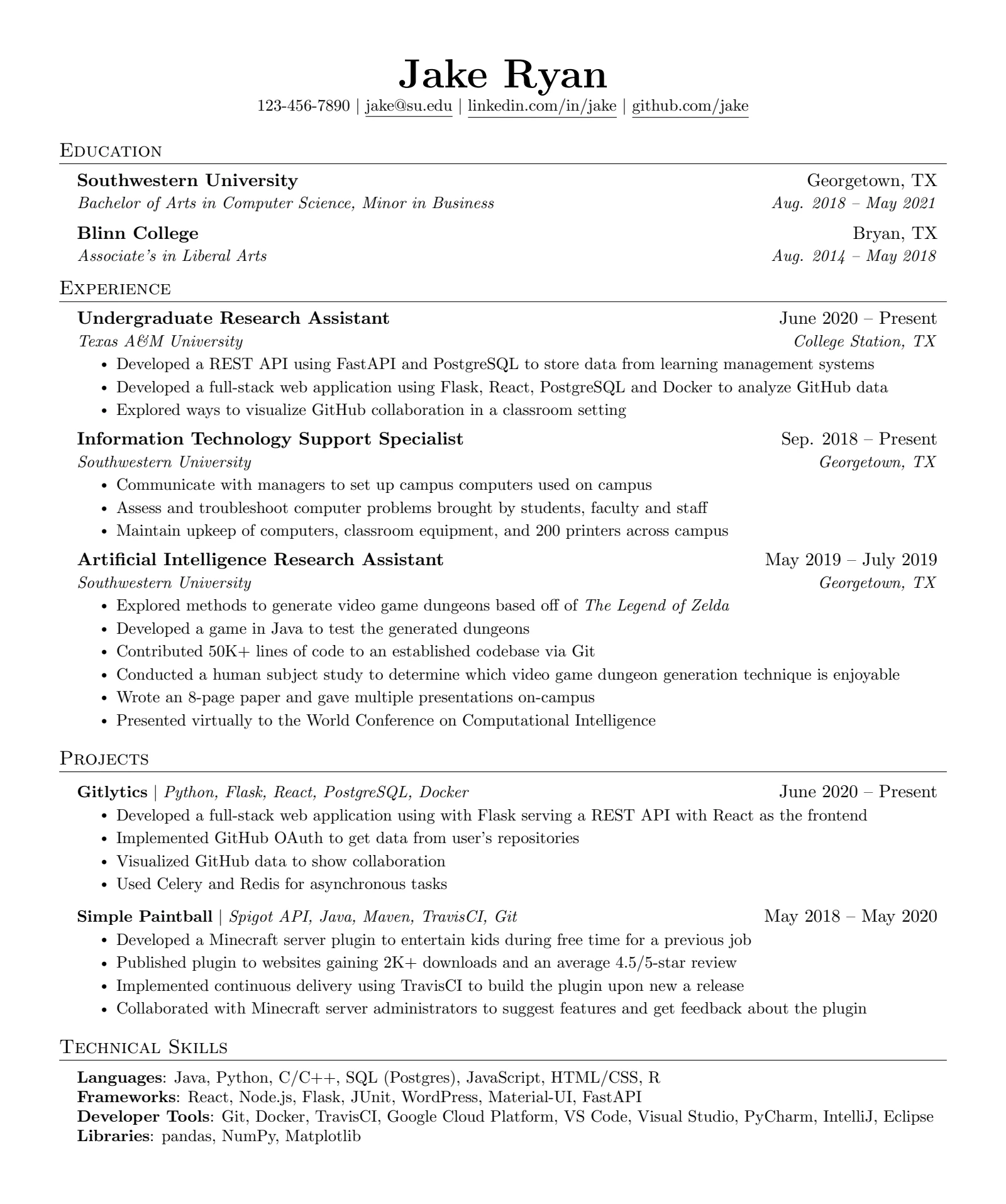
This guide shows you how to write your own CV with it, going through the template line by line: what each command prints, how to fill in each section, the characters that stop it compiling (with the errors they really give), and the two changes a UK or European CV needs. The button above opens this exact template in your LatexNotes account, already compiled, so you can follow along in your own copy.
Why write a CV in LaTeX?
A CV made in Word or Google Docs drifts: a bullet indents differently, one date is a point off, a line moves when you add a job. In LaTeX you type the content and the template does the layout, so every entry lines up the same way however often you edit it. The source is plain text, which makes it easy to keep one master CV and cut it down for each application, and the PDF has real, selectable text. It is also free.
The costs are real too. A handful of characters need a backslash (there is a section on them below), an error message can be cryptic, and if an employer or agency asks for a Word file, LaTeX cannot give them one directly. For most applications, which ask for a PDF, a template like Jake's takes those costs down to a few minutes.
What Jake's Resume is
Jake's template is a cleaned-up version of an older one: Sourabh Bajaj's sb2nov/resume from 2015, which has over 7,000 stars of its own. Both are under the MIT licence, which means you can use, change and share them freely, as long as the copyright and licence notice stays in the source file. Nothing has to appear on the PDF itself.
The design is deliberately plain:
- one column, no colour, no photo, no icons, no skill bars;
- section headings in small capitals with a rule underneath;
- each job as two lines, with the title in bold on the left and the dates on the right, then the employer in italics on the left and the place on the right;
- bullet points in a slightly smaller size, so a lot fits on one page;
- US Letter paper, 11 point text and narrow margins.
That plainness is the point. A recruiter skimming the page finds every job title down the left edge and every date down the right, and software reading the PDF finds one column of real text in the order you wrote it.
How to open Jake's Resume in LatexNotes or Overleaf
- In LatexNotes: press "Open Jake's Resume in LatexNotes" at the top of this post, then "Use this template". It opens as a LaTeX note with the code beside the compiled PDF. Change the text, press Recompile, and download the PDF when you are done. It works on a free account.
- In Overleaf: search the template gallery for "Jake's Resume".
- On your own computer: download jakes-resume.tex and compile it with
pdflatex, which comes with TeX Live and MiKTeX.
How Jake's Resume works: the commands
The file has two halves. Everything above \begin{document} sets up the page: the packages, the margins (the \addtolength lines make the text area an inch wider and an inch taller), the look of the section headings (\titleformat, which gives the small capitals and the rule), and a handful of commands Jake defined so that each part of the CV is one line of code. Everything below \begin{document} is your CV, written with those commands.
| Command | What it prints |
|---|---|
\resumeSubheading{1}{2}{3}{4} | An entry: 1 in bold on the left, 2 on the right, then 3 in italics on the left, 4 in italics on the right |
\resumeSubSubheading{1}{2} | A second role under the same entry: 1 in italics on the left, 2 on the right |
\resumeProjectHeading{1}{2} | A project: its name (and anything else) on the left, a date on the right |
\resumeItem{text} | One bullet point, in small type |
\resumeSubHeadingListStart and \resumeSubHeadingListEnd | Wrap all the entries in a section |
\resumeItemListStart and \resumeItemListEnd | Wrap the bullet points of one entry |
Here is one entry from the Experience section, and what it prints:
\resumeSubheading
  {Undergraduate Research Assistant}{June 2020 -- Present}
  {Texas A\&M University}{College Station, TX}
  \resumeItemListStart
    \resumeItem{Developed a REST API using FastAPI and PostgreSQL to store data from learning management systems}
    \resumeItem{Developed a full-stack web application using Flask, React, PostgreSQL and Docker to analyze GitHub data}
    \resumeItem{Explored ways to visualize GitHub collaboration in a classroom setting}
  \resumeItemListEnd
One thing catches people out. \resumeSubheading only knows positions, not meanings, and Jake uses it in two different orders. In Education the four arguments are the school, its town, the degree and the dates. In Experience they are the job title, the dates, the employer and the town. Both look right because the dates land on the right either way, but if you copy an entry from one section into the other, swap the arguments to match.
How to write each section of your CV
The heading
\begin{center}
    \textbf{\Huge \scshape Jake Ryan} \\ \vspace{1pt}
    \small 123-456-7890 $|$ \href{mailto:x@x.com}{\underline{jake@su.edu}} $|$
    \href{https://linkedin.com/in/...}{\underline{linkedin.com/in/jake}} $|$
    \href{https://github.com/...}{\underline{github.com/jake}}
\end{center}
Every contact detail is in there twice: once as the address the link goes to, inside the first braces of \href, and once as the text people see, inside \underline. Jake's own file shows these differ. The email reads jake@su.edu but links to x@x.com, and the LinkedIn and GitHub links end in "...". Change both halves of each, then click every link in your PDF before you send it. For a UK number, write it as +44 7700 900123 so it works from abroad.
Education
Put your current or most recent degree first. Students usually add the grade (or predicted grade) to the degree line, and a short bullet list underneath for relevant modules or a dissertation. Jake's Education entries have no bullets, but the same \resumeItemListStart block from Experience works under any entry.
Experience
Each bullet should say what you did and what changed because of it, starting with a verb, with a number wherever you have one. Jake's bullets are a good shape but light on results. "Maintain upkeep of computers, classroom equipment, and 200 printers across campus" says what the job was; a version with an outcome might read "Kept 200 printers and the equipment in 40 classrooms running, closing about 25 support requests a week". Three or four bullets for your main job and one or two for smaller ones is plenty.
If you held two roles at the same employer, the template has a command for it, \resumeSubSubheading, and Jake left an example in a comment. Uncomment it as it stands and the CV stops compiling with this error:
! LaTeX Error: Lonely \item--perhaps a missing list environment.The example ends with a \resumeSubHeadingListEnd that closes the section's list too early, and it passes two arguments to \resumeItem, which takes one. This version works. Put it straight after the first role's \resumeItemListEnd:
    \resumeSubSubheading
      {Undergraduate Teaching Assistant}{Jan. 2020 - May 2020}
      \resumeItemListStart
        \resumeItem{Ran weekly lab sessions for 30 students in an introductory Python course}
      \resumeItemListEnd
Projects
\resumeProjectHeading
  {\textbf{Gitlytics} $|$ \emph{Python, Flask, React, PostgreSQL, Docker}}{June 2020 -- Present}
The first argument is free text, so the name, a bar and the tools used are all in it. Add a link with \href{https://...}{\underline{name}} if the project is public. The bullets underneath work as in Experience.
Technical skills
The last section is a list without bullets (label={}), one line per group, with \\ at the end of every line but the last. Keep the groups to what the job asks for. Nobody reads a list of every tool you have opened once.
Adding a section
To add Leadership, Awards or Publications, copy the whole Experience section (from \section{Experience} to its \resumeSubHeadingListEnd), rename it, and replace the entries. The example CV further down has a Leadership section made this way.
The characters that stop it compiling
Five characters mean something special in LaTeX, and CVs are full of them: R&D, 30%, C#, a salary in dollars, a username with an underscore. Typed as they are, each one breaks the build. Put a backslash in front:
| You typed | Write instead |
|---|---|
R&D | R\&D |
30% | 30\% |
C# | C\# |
$4K | \$4K |
jake_ryan | jake\_ryan |
These are the real errors from building Jake's template with each mistake added:
R&D in a bullet       ! Misplaced alignment tab character &.
A&M in a heading      ! Forbidden control sequence found while scanning use of \check@nocorr@.
30% in a bullet       ! File ended while scanning use of \resumeItem.
C# in the skills      ! You can't use `macro parameter character #' in horizontal mode.
$4K in a bullet       ! Extra }, or forgotten $.
jake_ryan in the text ! Missing $ inserted.
Two of these are worse than they look. An & in a heading sits inside the table that lays out the line, where it means "next column", and the error that comes out names an internal command instead of your text. And % starts a comment: LaTeX ignores everything after it on that line, including the } that closes the bullet, so it reads the rest of the file as part of that one bullet and produces no PDF at all. If your CV suddenly will not build after an edit, search the line you just changed for these five characters first. Inside the address part of \href, a plain _ or % is fine; it is the visible text that needs the backslash.
A UK or European CV: A4 and length
Jake's file is set up for American applications. Two things change for the UK and most of Europe.
Paper size. Change the first line from letterpaper to a4paper:
\documentclass[a4paper,11pt]{article}A4 is 210 by 297 mm, a little narrower and taller than US Letter's 216 by 279 mm. Jake's sample still fits on one page after the change, but lines near the right edge can wrap differently, so look over the PDF again. A4 is the standard paper size in the UK and Europe, so use it for applications there.
Length. A US resume is one page. A UK CV can be longer, but TargetJobs puts it plainly: "The maximum standard length for a graduate CV is two pages of A4", and an employer's own instructions come first. Most students fill one page well and should stop there. If your CV runs over, the template simply continues on a second page; aim for two full pages rather than one and a bit.
UK readers may also want British spelling in Jake's sample text before they reuse it ("analyse", not "analyze").
Fonts, and the name line
Jake's code asks for the name in bold small capitals (\textbf{\Huge \scshape Jake Ryan}), but the default font setup has no bold small capitals, so LaTeX prints the name in ordinary bold and writes a warning to the log:
LaTeX Font Warning: Font shape `OT1/cmr/bx/sc' undefinedMost people never notice and keep it. If you want the small capitals the code asks for, add one line after the other \usepackage lines:
\usepackage[T1]{fontenc}
The rest of the page looks the same either way.
Near the top of the file, Jake also left six other fonts commented out. charter, a serif font, comes with every LaTeX installation and works anywhere, including LatexNotes: remove the % in front of \usepackage{charter}. The other five (Fira Sans, Roboto, Noto Sans, Source Sans Pro and Cormorant Garamond) are in TeX Live's large extra fonts collection. Overleaf has it; LatexNotes does not install it, so a build that asks for one fails.
Is it ATS-friendly?
An applicant tracking system (ATS) reads the text out of your PDF and files it into fields. Jake's template has two lines aimed at this, with the comment "Ensure that generate pdf is machine readable/ATS parsable":
\input{glyphtounicode}
\pdfgentounicode=1
They make pdfTeX attach a table to each font that says which letter every shape stands for, so that ligatures such as "fi" and symbols come out as real text. They mattered in 2020. Since late 2021, LaTeX does this by default, as Ulrike Fischer of the LaTeX team noted on the TeX Live mailing list at the time. We built Jake's template with and without the two lines and extracted the text with two different PDF readers: the output was identical. Keep them; they are harmless and help on an older installation.
What actually makes the template easy to read is the single column of plain text. This is what PDFium, the PDF engine inside Chrome, reads from the example CV below:
Amira Hassan
+44 7700 900123 | amira.hassan@example.com | linkedin.com/in/amira-hassan | github.com/amirahassan
Education
University of Leeds Leeds, UK
BSc Mathematics, predicted First Class (78% average) Sep. 2023 - June 2026
• Modules: Probability, Stochastic Processes, Numerical Analysis, Statistical Learning
• Dissertation: forecasting hospital bed demand with Bayesian time-series models
Andover College Andover, UK
A levels: Mathematics A*, Further Mathematics A*, Physics A Sep. 2021 - June 2023
Experience
Data Science Intern June 2025 - Aug. 2025
Northline Energy, R&D team Manchester, UK
Every word is there, in reading order. Not every reader agrees on the order, though: pdftotext, another common one, read the Education dates and towns as a separate block after both entries. Nothing was lost, which is what counts, and it is a reason not to cram extra things into the right-hand column.
A filled-in example
Here is the template as a UK maths student might use it, with A4 paper, the T1 line for the small-caps name, an Education entry with bullets and a Leadership section. The escaped characters from the table above are in use too: R\&D, 30\%, C\# and 78\%.
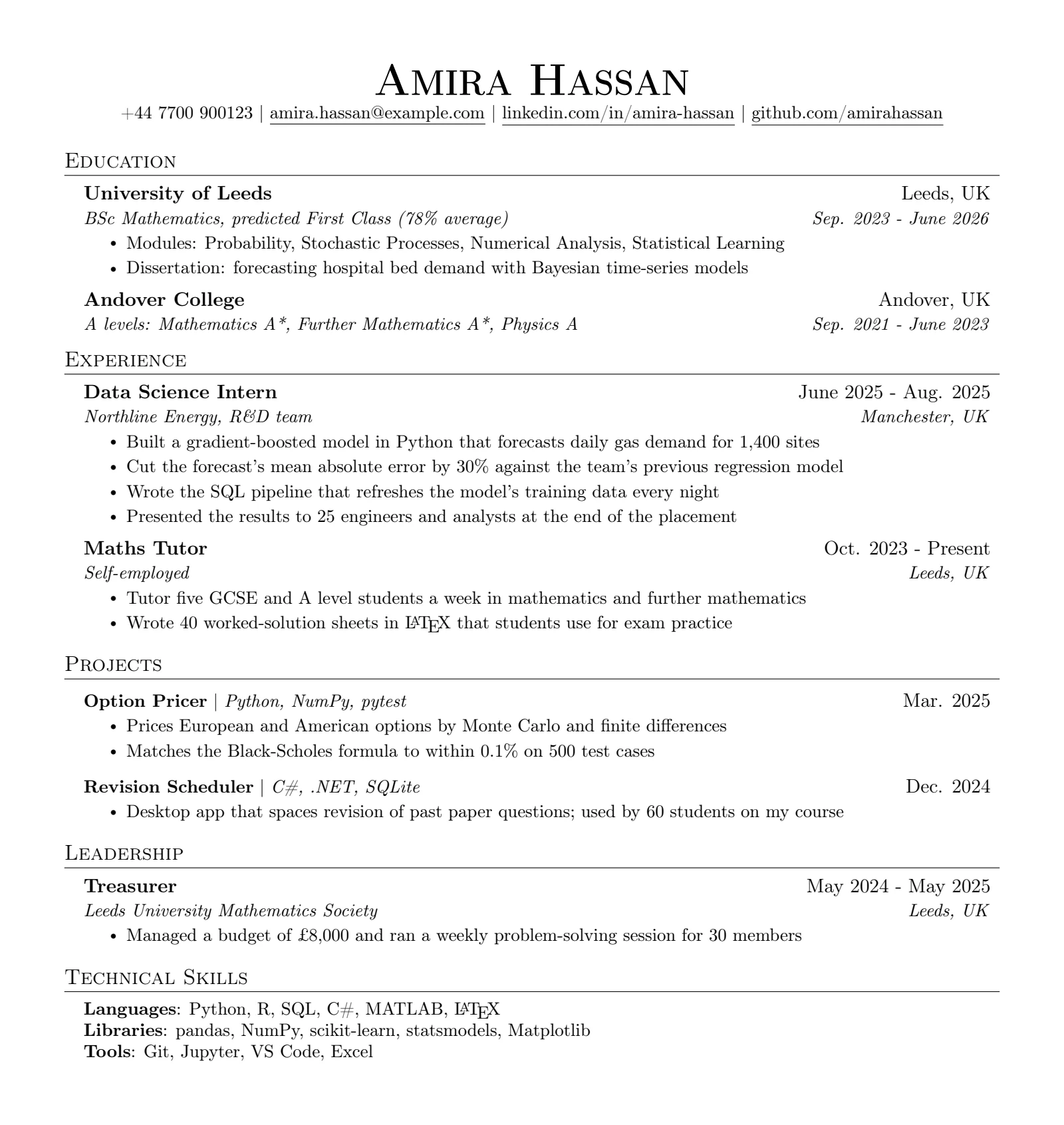
Downloads: jakes-resume.tex (Jake's file, unchanged apart from one curly apostrophe made straight, with its MIT licence notice) and its PDF; example-cv.tex and its PDF.
Is there a Word or Google Docs version?
No. Jake published his template as a LaTeX file only, so the "Jake's Resume" Word and Google Docs files you will find on template sites are other people's copies of the look, not his template. If you need a Word file, write your CV in LaTeX first and keep the PDF as the master copy, then rebuild the layout in Word for the one employer who asks for .docx.
More CV and resume templates
Jake's Resume suits most internship and graduate applications. The LatexNotes template gallery has a few others for different jobs, each one opening in your account the same way:
- Software engineer resume: the same one-column style with a shorter, tidier preamble.
- Resume: a one-page UK student CV on A4.
- Academic CV: for PhD and research applications, where publications and talks matter more than one page.
- Cover letter: to send with any of them.
All of them are in the LaTeX templates gallery, with theses, reports and slides.
Before you send it
- It is one full page, or two full pages if the employer allows it.
- Every link in the PDF goes where it says.
- You searched the source for
&,%,#,$and_and escaped the ones in your text. - LaTeX does not check spelling, so paste the text into a spell checker once.
- Select all the text in the PDF and paste it somewhere plain. If it reads in order, a tracking system can read it too.
- The file has your name in it, such as
Amira-Hassan-CV.pdf, notresume.pdf.
Frequently asked questions
What is Jake's Resume?
A free one-page CV template written in LaTeX by Jake Gutierrez and published on GitHub in 2020, based on Sourabh Bajaj's sb2nov/resume. It has one column, small-caps section headings and dates aligned on the right, and it is listed on Overleaf as "Jake's Resume".
Is Jake's Resume free to use?
Yes. It is under the MIT licence: you can use, change and share it, including for your own CV. Keep the copyright and licence notice in the .tex file; nothing needs to appear on the PDF.
Is LaTeX good for a CV or resume?
Yes, for most applications. The template keeps every entry lined up however often you edit it, the source is plain text you can keep as one master CV, and the PDF has real, selectable text. The costs are a few characters that need a backslash and cryptic errors; and if an employer asks for a Word file, LaTeX cannot produce one directly.
Is there a Word or Google Docs version of Jake's Resume?
No. Jake published it as a LaTeX file only; the Word and Google Docs versions on template sites are other people's copies of the look. Open the real template free in LatexNotes or Overleaf, or compile the .tex file yourself.
Is Jake's Resume ATS-friendly?
Yes. It is a single column of real text, so applicant tracking systems can read every word in order. Its two ATS lines (\input{glyphtounicode} and \pdfgentounicode=1) are LaTeX's default since 2021, so they change nothing on a current installation, but they do no harm.
How do I change Jake's Resume to A4?
Change the first line to \documentclass[a4paper,11pt]{article} and recompile. Jake's sample still fits on one page, but check for lines that wrap differently.
How do I add a second job at the same company?
Put \resumeSubSubheading{role}{dates} straight after the first role's bullets, followed by its own \resumeItemListStart and \resumeItemListEnd. Do not uncomment Jake's example as it is: it closes the section's list early and the CV stops compiling.
Why won't my LaTeX CV compile?
Usually because of a special character in the text: &, %, #, $ or _. Put a backslash in front of each one (R\&D, 30\%, C\#). A bare % is the worst, because it comments out the closing brace and the error then points at the end of the file.
Can I use Jake's Resume without Overleaf?
Yes. Open it in LatexNotes with a free account, or download the .tex file and compile it with pdflatex on your own computer.
Sources
- Jake Gutierrez, jakegut/resume, the template and its MIT licence (GitHub, 2020).
- Sourabh Bajaj, sb2nov/resume, the template Jake's is based on (GitHub, 2015).
- Overleaf, Jake's Resume, the template in Overleaf's gallery.
- Ulrike Fischer, "CMap issue in PDF file generated with recent TeX Live + Ghostscript", TeX Live mailing list, October 2021, on LaTeX setting
\pdfgentounicode=1by default. - TargetJobs, How long should a CV be for graduate jobs?.
More from the blog
 LaTeX guides
Maths to LaTeX: How to Convert Any Maths, With 150+ Examples
How to turn maths into LaTeX: write it yourself or convert handwriting, photos, PDFs, Word and AI output, with 150+ maths to LaTeX examples to copy. Note-taking
Cornell Notes for Maths: The Method, an Example and a Free LaTeX Template
How the Cornell note-taking method works, why it suits maths, a worked lecture example, and a free LaTeX Cornell notes template to copy or download.